Cyber Café Software, Hotspot Billing Software, Call Shop Software Logiciel pour Cybercafés, Logiciel pour Hotspot, Logiciel pour Call Shop Hotspot Software, Internetcafés Software, Cybercafés Software, Call Shop Software Software para Internet Café, Software para Hotspot, Software para Cibercafé y Call Shop Software per Internet Point, Hotspot WI-FI, Phone Center Programa para Cyber café, Programa para Internet café, Programa para Hotspot e de Call Shop
Cyber Café Software, Hotspot Billing Software, Call Shop Software Download Cyber Café Software, Download Hotspot Billing Software,Download  Call Shop Software alt= alt= Softvision Explorer Support Forum Contacts

Software for Cyber Café, Hotspot WI-FI, Call Shop


Hotspot, Call Shop and Cyber Café Software : Smart Card Utility


This function, accessible from the Utility Menu, allows viewing the contents of a Smart Card and, if necessary, resetting it.
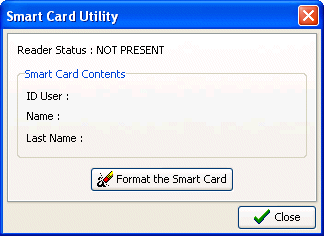


After the window opens, insert the Smart Card and the screen will display the principal user data, i.e., his internal program ID and first and last name. At this point, you can zero the Smart Card with the "Format Smart Card" button. This operation is necessary, for example, when a customer returns his Smart Card because he no longer intends to use it. After formatting, the card can be assigned to a new customer.

Software
Cyber cafè Hotspot Call Shop Manual Orders

Installation and Configuration
Internet Café Hostspot Call Shop

Hardware
Smart Card Reader Smart Card Electronic Coin Acceptors

Support
Support Update Bug Report Suggestions About Softvision Contact us

Resources


Softvision logo