Softvision Explorer 4 supports USB electronic coin acceptors. By using these devices Internet Café customers can recharge their pre-paid credit by simply feeding coins into the coin acceptor. All our devices support all eight types of coin, from 1 euro cent up to 2 euro.
Coin acceptor complete with lockable container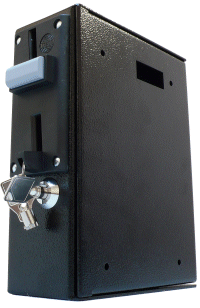 |
Coin
acceptor without container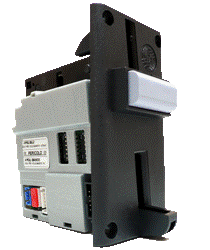 |
A coin acceptor for each navigation terminal : in this case all terminals have a coin acceptor. When connected, users can recharge their credit during navigation by simply feeding in coins. Users who are not connected and do not have sufficient credit to log in can gain access to a special screen that allows them to insert coins and then log in.
Only one coin acceptor dedicated to one re-charge terminal : in this case the coin acceptor is connected to a computer that is used only by customers re-charging their credit The Explorer Coins software module is installed on this computer. This enables users to log in and recharge their credit by feeding in coins. As with the navigation terminals, users can log in using either their username and password, or their SmartCard.
Connection to the computer is made using an USB adaptor.
Normally, a strong metal container with a lock is part of the coin acceptor.
It can be fixed to a surface (e.g. the wall) using the holes provided. You
can also buy the coin acceptor without container. In this case, the user
will have to provide a slot for the coin acceptor.
To configure the coin acceptor, you only have to choose a communications
port for it. This can be done automatically by the programme scanning the
serial ports.
Whether you use Explorer Coins or Explorer Client you only have to click on
the "Config." button, then proceed to enable the coin acceptor and the
configuration of the communications port.
Softvision - Via Cesare Battisti, 101 - 67051 Avezzano (AQ) ITALY - P.IVA 02081660660 | Privacy Policy - Cookie Policy