Softvision Explorer is a comprehensive program for the management of Cyber Cafés and Internet Cafés. The system basically consists of two modules:
 Explorer Manager : SERVER module for system administration (user management, top ups, archive analyses, etc.) available for Windows operating systems.
Explorer Client : CLIENT module for the management of navigation workstations, available for both Windows platforms and the Linux (Ubuntu
9) operating system with Gnome desktop.
Softvision Explorer lets you create an Cyber Café or an Internet Café where the server is a Windows machine while the clients (navigation workstations) can be both on a Windows and Linux computer. A mixed system is also available, consisting of some Windows workstations and some Linux workstations.


Using Linux in Cyber Cafés undoubtedly results in significant savings compared to Windows for the following reasons:
Linux is a free operating system while the price of a license for the cheapest Windows operating system (Windows XP Home OEM) is around 80 euro. For a medium-sized Internet Café with 10 workstations, not having to purchase the license for the operating systems already saves you 800 euro !
On average Linux requires less powerful hardware, making it possible to use cheaper and less advanced PCs with excellent results. An additional saving of 100 euro per workstation can be hypothesised, for a total saving of 1000 euro when considering the Cyber Café examined above!
All software running on Linux is practically free. All the main programs used in Cyber Cafés are available in their free version: Open Office (word processing, spreadsheets, etc.), Firefox for navigation, Skype for VoIP and chatting, any kind of games, etc.
Another major advantage lies in Linux's high level of security. Indeed, this is a very secure and reliable operating system, hard for viruses to attack and which, if necessary, can be configured by the administrator to execute only certain operations. In Ubuntu, for example, it is virtually impossible to install any drivers, packages, etc. without the administrator password (root).
Installing the client module on Linux Ubuntu 9 is very easy. Simply download the debian package from the
download page and double click on the downloaded file (explorerclient.deb). The file will be automatically installed by the Ubuntu package manager.
To launch the program after installation, simply click on the Ubuntu Internet I Applications menu item. When first starting the program, an automatic server search will be started by exploring all the IP addresses of the subnetwork. After finding the server, the program will automatically show the program configuration page where the root password must be entered.
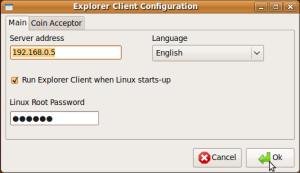
This is a fundamental step for the program's correct operation since many functions, such as the visited sites log and the user drive mount through samba, require the administrator privileges (root).
Upon completing the configuration phase, the workstation access page will appear, enabling the Cyber Café user to use the workstation by entering a username and password.
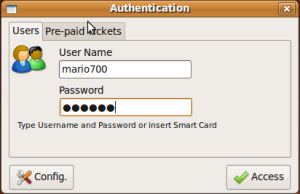
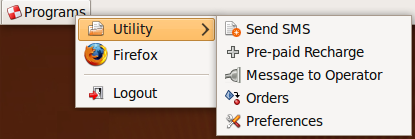
After logging in, the Ubuntu upper bar will be replaced by the Explorer Client bar containing a menu that allows only the programs selected in Explorer Manager to be launched and other operations such as account configuration, product orders, etc.
Softvision - Via Cesare Battisti, 101 - 67051 Avezzano (AQ) ITALY - P.IVA 02081660660 | Privacy Policy - Cookie Policy