In this case wired workstations are on LAN 1 and WI-FI users and any additional wired workstations (which don't necessarily execute Windows) are connected to LAN 2
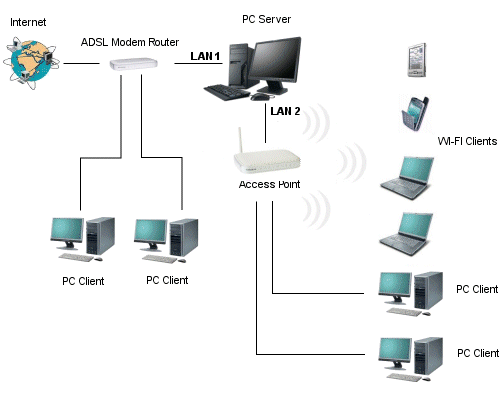
The advantage
of LAN 2 connections is that the internet traffic generated can be controlled
by Explorer Manager using the firewall’s functions, and bandwidth limitations
can be implemented by the programme’s User Groups function. Another advantage
is that, for LAN 2 connections the traffic log is directly implemented
by the server and not the customer, as happens for LAN 1 workstations.
This implies that the traffic generated by any applications used by the
customer is logged and not only that generated by Internet Explorer, as
happens with wired workstations on LAN 1. Users connected through LAN
2 can therefore use alternative browsers like Firefox, Opera etc., email
programmes, FTP or any other programmes that use the internet.
Use of Linux for wired workstations on LAN 2
Another advantage of wired workstations connected on LAN 2 is that they do not necessarily have to use Explorer Client, the aim of which is to allow user authentication and to protect the machine against damage by users (erasure of system files etc.)
If alternative systems are used to protect the machine, you can decide not to install Explorer Client and carry out authentication using any Web browser that accesses the page http://192.168.1.2/login.htm . Following authentication, users are connected to the internet and can then use any application installed on their computer (browser, chat etc.)
This mode of navigation also opens the door to the use of Linux as the operating system for LAN 2.
Linux is an inherently secure operating system which is well suited for this purpose. In fact it is sufficient to create an account with greatly reduced privileges to ensure a reasonable degree of protection for the machine. The user can carry out authentication using the browser and access the internet with any installed Linux software.
Using the Linux operating system offers an important economic advantage. In fact this solution will save the expense of both the Windows operating system and the Explorer Client customer licences.
The software configuration of Linux is reduced to the wireless network card configuration, which must be made to obtain the IP and DNS servers automatically
Softvision - Via Cesare Battisti, 101 - 67051 Avezzano (AQ) ITALY - P.IVA 02081660660 | Privacy Policy - Cookie Policy