There are three
workstation display modes :
Icon : the default mode. Each workstation has an associated icon that clearly describes the type. In this case the workstation monitor can also have a foreground image, defined in the "Layout" section of the Preferences function, showing the premises hosting the workstations.
Frame : the workstation is represented by a frame containing the name of the workstation and information on connection.
Table : the workstations are displayed inside the table where each line corresponds to a workstation. This is a very compact display mode, which is useful where there are lots of workstations.
Based on the type of workstation, the data displayed are: the name (or alias) of the workstation, the possible user connected, the remaining or used credit and the time of use.
Computers connected via WI-FI to the Hotspot will be displayed slightly differently to wired workstations : instead of the name of the workstation, the IP address (e.g. 192.168.1.100) of the computer connected via WI-FI is displayed, as well as a notebook workstation icon in the icon display instead of the PC monitor.
The workstations can have different statuses and each one has an associated colour :
Not enabled : grey is associated to this status. A workstation that is not enabled cannot execute the Explorer Client navigation program. Naturally, only PC type workstations can have this status.
Free : the workstation is not busy and can accept connections. Green is associated to this status.
Explorer Client not executed : the navigation workstation (PC type) is enabled, however the Explorer Client program is not running. Olive green is used.
Busy : a user is using the workstation, which appears in red.
Under maintenance : a workstation with this status, identified in yellow, is blocked and no user can access it.
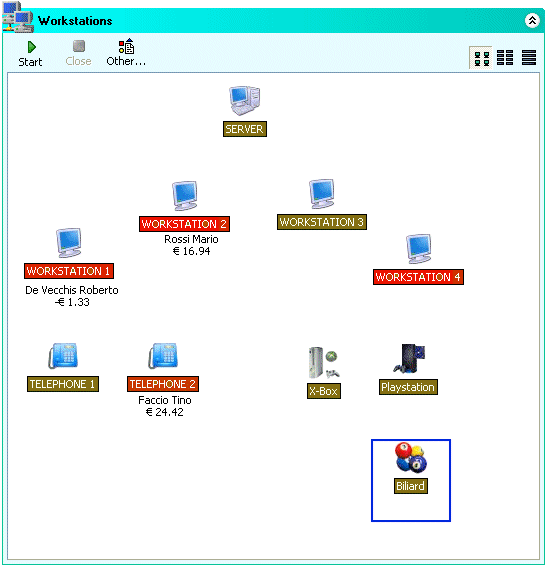
By clicking the right key of the mouse on the workstation or clicking the "Other.." button, you access the menu that allows you to run all the operations possible on the workstations :
Start a new session : allows manual start-up and a new session on the workstation.
Add a workstation : you can use this item to add a new workstation. For example this function must be used to add a new PC to the network or when a new telephone is connected.
Change a workstation : allows you to change the features of an existing workstation (type, alias etc).
Delete a workstation : removes the workstation from the monitor.
Workstation enabled : this flag allows the enabling or disabling of the selected workstation.
Workstation under maintenance : by enabling this flag, the workstation is put in "Maintenance" status, which is yellow. No user can access the workstation as long as it has this status.
Message to selected workstation : send a message to a user connected to the workstation and open chat.
Transfer session : allows transfer of the user, currently logged in on the selected workstation, on any other free workstation.
Display screen-shot : displays a photo of the workstation monitor content.
Volume Control : allows you to change the audio record volume of the workstations. For example, this is useful for customers using games or other applications with a level of volume that disturbs other users.
Remote Control : using this function, you can remotely control a workstation computer. A VNC server automatically installed on all the workstations is used for the control. Remember that this function is independent of the Explorer Client module and therefore can be used if the workstation is not executing this program.
Task Manager : allows you to obtain a list of programs running on one or more workstations. Use the "Close" button to force closure of any application.
End selected session : by clicking this item, you can force end the session on the selected workstation. This function is necessary to close any sessions that accidentally remained open or to force a customer to disconnect.
Restart or shut-down of selected workstation : restart Windows or shut-down the computer on the selected workstation.
Start workstation : enables use of the Wake On Lan (WOL) function to access the computer using the Lan. To use this functionality, the computer mother boards to activate must support WOL.
Close Explorer Client : this function allows you to close the Explorer Client navigation program without having to start-up the workstation. In this way, the administrator will be not forced to type his/her password with users present.
Using the "All workstations" sub-menu, you can execute some of the previous operations (close session, re-start etc.) on all the workstations simultaneously.
Softvision - Via Cesare Battisti, 101 - 67051 Avezzano (AQ) ITALY - P.IVA 02081660660 | Privacy Policy - Cookie Policy