Softvision Explorer includes the typical Internet Café functions that allow the user to send orders to the operator of the premises directly from the workstation. The users selects the products to order from a list, which the administrator can create using the Products function in the Settings Menu. The products can be organized into categories. For example, there can be categories for food, beverages and consumables such as CD-Rs, floppy disks, etc.
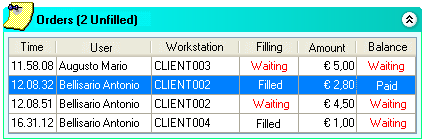
When a user places an order, it is immediately displayed in the Orders area on Explorer Manager's main screen. This area shows all the orders placed during the day. For each order it displays the user who placed it, the workstation, the time, the amount, its fulfillment status and the balance due.
Each unfilled order is followed by "To be filled," and orders that have not been paid are followed by "To be paid" in red.
Clicking on the order displays a window with the details of the order, i.e., the products ordered, any notes and the order status (filled and balance due).
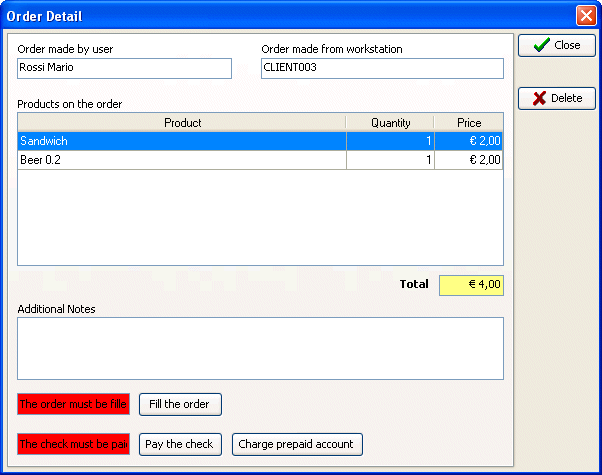
At this point, the order can be filled by clicking "Fill the order". To pay the balance, you have to debit the check to the customer's prepaid credit or just mark the order "Paid". This latter option is typically used when the customer pays in cash because he doesn't have sufficient prepaid credit or because he is navigating in post-paid mode.
Finally, the order can be completely deleted from the archive with "Delete". This function is useful when, for example, a customer cancels an order because he made a mistake entering it.
Softvision - Via Cesare Battisti, 101 - 67051 Avezzano (AQ) ITALY - P.IVA 02081660660 | Privacy Policy - Cookie Policy