Cyber Café Software, Hotspot Billing Software, Call Shop Software Logiciel pour Cybercafés, Logiciel pour Hotspot, Logiciel pour Call Shop Hotspot Software, Internetcafés Software, Cybercafés Software, Call Shop Software Software para Internet Café, Software para Hotspot, Software para Cibercafé y Call Shop Software per Internet Point, Hotspot WI-FI, Phone Center Programa para Cyber café, Programa para Internet café, Programa para Hotspot e de Call Shop
Logiciel pour Cybercafés, Logiciel pour Hotspot, Logiciel pour Call Shop Download Cyber Café Software, Download Hotspot Billing Software,Download  Call Shop Software Cyber Café Software Orders, Hotspot Billing Software Orders, Call Shop Software Orders alt= Softvision Explorer Support Forum Contacts

Logiciel pour CyberCafé, Hotspot WI-FI, Call Shop


Logiciels pour Cybercafés, Hotspot et Call Shop: Utilitaire de carte à puce

Index du Manuel


Grâce à cette fonctionnalité, accessible depuis le menu Utility, vous pouvez voir le contenu d'une carte à puce et peut-être soumis à zéro.
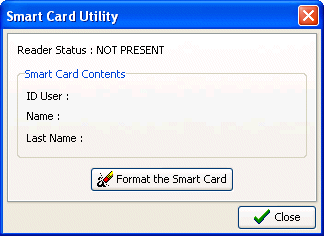


Après l'ouverture de la fenêtre, il suffit d'insérer la carte à puce et immédiatement affichée sur l'écran le contenu principal du client, ou son ID interne au programme, son nom et son prénom. À ce moment, en utilisant le bouton "Format de la carte à puce", vous pouvez procéder à un montant total de la carte. Cette opération est nécessaire, par exemple, lorsqu'un client de retour parce que votre carte n'a pas l'intention de l'utiliser. Après formatage, la carte peut être attribué à un nouveau client.

Logiciel
Cybercafé Hotspot Call Shop Manuel en ligne Acheter en ligne

Installation et configuration
Cybercafé Hotspot Call Shop

Matériel
Systèmes Cashless Lecteurs de carte à puce Carte à puce

Support
Assistance technique Mises à jour du logiciel Signalisation des bogues Suggestions Qui sommes-nous ? Nous contacter VoIP WI-FI Hotels Cybercafé Linux Privacy Policy


Logo de Softvision