Softvision Explorer supports three workstation types :
PC : this type of workstation includes a PC connected via a Lan to the server, that executes Explorer Client. This type of workstation is commonly used for navigation and gaming. In general, the customer can directly start-up (login) this workstation by entering his/her access credentials. Alternatively, the user can be manually logged in from the server using the Workstation | Start a Session function.
A surfing workstation can be used in two different ways:
-
PC with access through credentials: to be able to surf or run programs on the PC when using this mode, you must enter access credentials (login/password, pre-paid tickets or Smart Card). By default, the cost of surfing and the type of use of the station are determined, respectively, by the Rate Plan and Group the user logging in belongs to but it is also possible to define a Rate Plan and Group for each station to use in place of those of the user that is connecting. This function is useful, for example, if you want to reserve a station for gaming or other particular uses.
-
Kiosk PC: a Kiosk station is a computer with free access. On this type of station, Explorer Client is only used to limit the use of the PC to those purposes defined by the system administrator and specified by the User Groups indicated for the station. The most frequent case is where you want to create a Kiosk exclusively for surfing the Internet, but it is also possible to allow the PC to run a certain number of applications defined by the system administrator.
VoIP Telephone : this is a telephone workstation, identified by its IP address, used within a Call Shop. In this case the workstation is composed of a SIP telephone connected to the server via a Lan. Start-up of this type of workstation must be made from the server using the Start Session function. Remember the phone can be used to make calls only after this workstation has started-up. When the user ends the calls the operator is responsible for workstation shut-down.
Other type of workstation : in general, these types of workstations are not controlled by the server and can greatly vary in nature (game consoles, pool tables etc.). Start-up of this workstation is obviously manual. Managing these types of workstations is useful because even though the server does not control the workstations, it will keep track of the time of use, by applying the relevant use rates to the user associated to the workstation.
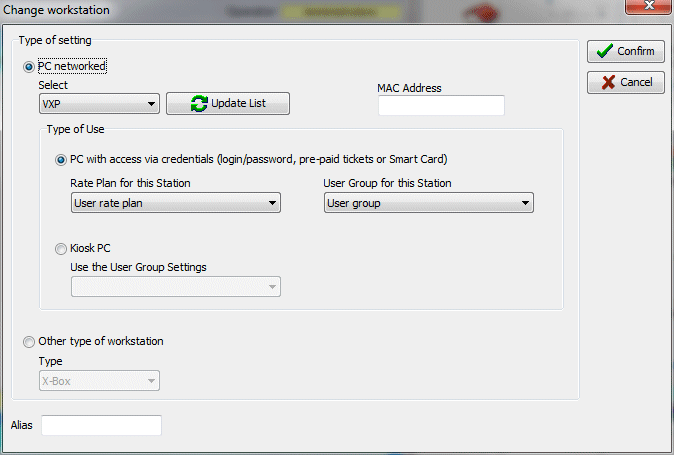
Normally the workstations are displayed in the workstation monitor, with a default name (name of computer online or IP address of SIP telephone). This name can be replaced by an alias that most appropriately describes the workstation in question.
Softvision - Via Cesare Battisti, 101 - 67051 Avezzano (AQ) ITALY - P.IVA 02081660660 | Privacy Policy - Cookie Policy