Explorer Manager's main window is the heart of the program and, in fact, all functions can be reached from this window, which also monitors various aspects of the program such as workstation usage, printing, etc.
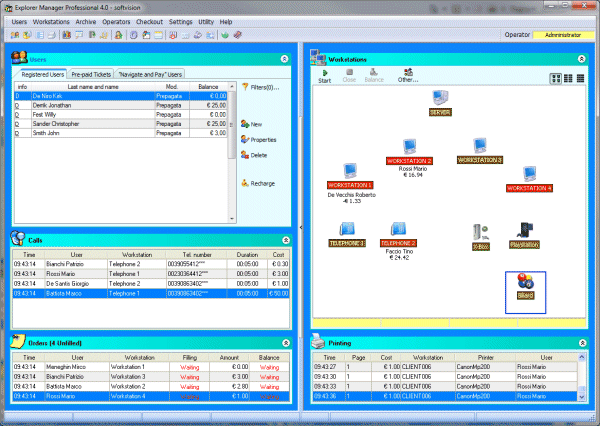
Based on the selected use mode, the screen area can contain up to five different sections :
Users
This section displays the list of customers in the archive and several buttons for creating or modifying a user or recharging his credit. For more information about this section, see User Management.
Calls
This section
is just under the previous one. It displays all the calls made during
the day. Various information is shown for each call : the customer who
made the call, the telephone number called, the workstation and the cost
of the call.
Workstations
The right side of the window lists the workstations and their status. The functions in this section are described in Workstation Management.
Orders
Located under users, this section monitors customer orders. The title bar of this section displays the number of unfilled orders (in parentheses).
Printing
The last section has to do with Printing. This area lists the printouts made during the day.
Each of the previous sections can be hidden using small arrow buttons on the right of the title of each section.
The bottom of the window has a status bar containing information on the number of active navigation workstations, the number of telephones registered, the number of SMS available and the dates of the last complete and partial backup.
Softvision - Via Cesare Battisti, 101 - 67051 Avezzano (AQ) ITALY - P.IVA 02081660660 | Privacy Policy - Cookie Policy