Backing up the program archives is of vital importance for a variety of reasons. In fact, in the case of lost data due, for example, to a hard disk failure (an event that is hardly rare), all the users' data would be lost. This could lead to more or less serious problems: for example, should all customer receivable data be lost, you would not be able to provide session data to the courts, not to mention scanned documents, registry master file data, etc. For this reason, Explorer Manager provides a variety of functions dedicated to safeguarding the data and, thanks to which, it is possible to quickly restore the archives if they are damaged.
The program can backup the data in two different ways:
Manual Backup
Selecting Backup on the Utility Menu opens a window for performing a manual backup of the archives:
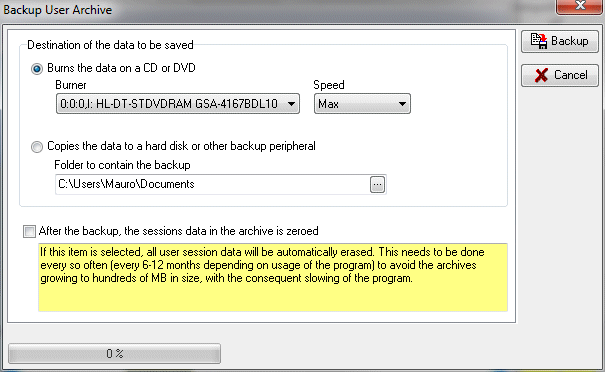
In this window, it is possible to make a complete backup of the data directly to a CD-R or DVD-R, or any other peripheral. It is also possible to automatically delete user session logs by selecting the item "Delete the data after backup". This needs to be done every so often (every 6-12 months depending on usage of the program) to avoid the archives growing to hundreds of MB in size, with the consequent slowing of the program. If you want to analyse a user's navigation sessions after the session has been deleted, just use the Analyse Archive function, specifying the name of a backup file made before the data was deleted.
Let's clarify this last concept with an example. Suppose that the program has been used for several months without ever deleting the session logs. On 1 August 2007 at 15:00, we decide to make a new backup with the option to delete the session logs. The program creates a backup file called User-Archive-2007-08-01-15.00.00.zip.zip. This file contains all the archive data, including the users' navigation sessions. At this point, if it becomes necessary to consult user's navigation sessions from before 1 August 2007, if would be necessary to use the Analyse Archive function, specifying the name of the backup file that contains the data in question, i.e., that created with the backup of 1 August 2007 (User-Archive-2007-08-01-15.00.00.zip).
Softvision - Via Cesare Battisti, 101 - 67051 Avezzano (AQ) ITALY - P.IVA 02081660660 | Privacy Policy - Cookie Policy