Softvision Explorer
monitors the customer's printing and automatically debits the cost to
his prepaid or post-paid account.
The program can monitor the majority of USB and network printers currently on the market. For USB printers connected to a computer not executing Explorer Manager or Explorer Client, for correct monitoring you need to install the Explorer Printer Monitor module on the computer , which has the USB printer physically connected.
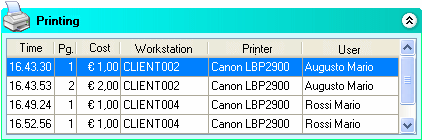
The number of pages the customer printed during the day is also displayed in Explorer Manager's main window, in the "Printing" in the lower right. For each printout, it shows the user's name, the date and time, the printer used, the document name and the number of pages.
It should be emphasized that this data is displayed for your information only and that printing is debited completely automatically without the administrator having to do anything.
Softvision - Via Cesare Battisti, 101 - 67051 Avezzano (AQ) ITALY - P.IVA 02081660660 | Privacy Policy - Cookie Policy